> ## Documentation Index
> Fetch the complete documentation index at: https://runrehearsals.com/docs/llms.txt
> Use this file to discover all available pages before exploring further.
# Identify Users
> Merge behavioral and preferential data to create AI digital twins of your customers
In order to merge behavioral and preferential data to create AI digital twins of your customers, Rehearsals needs to identify individual users. This is the most guaranteed way to build accurate customer profiles and get a complete picture of how they're using your product across different sessions, devices, and platforms.
While Rehearsals can also extract user information through visual events (automatically detecting emails and names in your UI), programmatically identifying users is the most efficient and consistent method.
## Quick Start
After a user logs in or signs up, call `identify()` to link their sessions to their user profile
```javascript theme={null}
// After user authenticates
rehearsals.identify('user@example.com');
```
We also allow custom parameters to be injected with `{}` . By default, we allow an identifier, email and fullName, to add additional properties see NEW SECTION, the code you write would look like this:
```javascript theme={null}
// After user authenticates
rehearsals.identify('user-123', {
email: 'user@example.com',
fullName: 'John Doe',
customAttribute: 1234
});
```
When a user logs out, call `reset()` to start a fresh anonymous session:
```javascript theme={null}
// On user logout
rehearsals.reset();
```
## How identify() Works
When a user visits your website, Rehearsals automatically assigns them an **anonymous session**, which is stored locally. This enables us to track anonymous users even across different page visits.
By calling `identify()` with a unique user ID from your system (usually from your database), you link all of that user's sessions together.
This enables you to:
* Track a user's behavior across multiple sessions
* See what they did before they logged in for the first time
* Associate their activity across different devices
* Build comprehensive user profiles with behavioral insights
### Viewing Identified Users
To see your identified users, log into the [Rehearsals Dashboard](https://app.runrehearsals.com), go to the Data folder in the sidebar, and click on Users.
## API Reference
### `rehearsals.identify(userId, properties)`
Links a user to the current session.
#### Parameters
* **`userId`** (string, required) - Your unique user identifier. This should be:
* An email (recommended)
* A string that uniquely identifies the user in your system
* Typically a database ID, UUID, or similar
* **Must be unique per user** - two users should never have the same ID
* **`properties`** (object, optional) - Additional user information:
* `email` (string) - The user's email address
* `fullName` (string) - The user's full name
* `customAttribute` (string | int | boolean) - See [our documentation](#custom-attributes) to add any custom attribute
#### Returns
A Promise that resolves when the user is successfully identified. You typically don't need to await this - it runs in the background without blocking your page.
#### Examples
```javascript theme={null}
// Simple usage (recommended)
rehearsals.identify('user@example.com');
// With custom attributes
rehearsals.identify('user-123', {
email: 'user@example.com',
fullName: 'John Doe',
customAttribute: 1234
});
// With await (if you need to know when it completes)
await rehearsals.identify('user@example.com');
```
### `rehearsals.reset()`
Ends the current session and starts a new anonymous session. Call this when a user logs out to ensure their sessions are properly separated.
#### Returns
A Promise that resolves when the session has been reset.
#### Example
```javascript theme={null}
// On user logout
rehearsals.reset();
// Or with await
await rehearsals.reset();
```
## Best Practices
### 1. Call identify() as soon as the user is authenticated
Call `identify()` immediately after a user logs in or when your app loads if the user is already authenticated:
```javascript theme={null}
// After login success
async function handleLogin(email, password) {
const user = await loginUser(email, password);
// Identify the user
rehearsals.identify(user.email);
}
// On app load (if user is already logged in)
window.addEventListener('load', () => {
const currentUser = getCurrentUser();
if (currentUser) {
rehearsals.identify(currentUser.email);
}
});
```
You only need to call `identify()` once per session. If you call it multiple times with the same data, subsequent calls will update the user information if needed but won't create duplicates.
### 2. Use unique strings for user IDs
**Critical:** If two users have the same user ID, their data will be merged and they will be considered one user in Rehearsals.
**Good examples:**
```javascript theme={null}
rehearsals.identify('user@example.com'); // email
rehearsals.identify('user-abc-123-def'); // UUID
rehearsals.identify('12345'); // Database ID
rehearsals.identify('auth0|507f1f77bcf86cd799439011'); // Auth provider ID
```
**Bad examples - DO NOT USE:**
```javascript theme={null}
rehearsals.identify('user'); // ❌ Generic, not unique
rehearsals.identify('true'); // ❌ Not a user ID
rehearsals.identify(null); // ❌ Invalid
rehearsals.identify(undefined); // ❌ Invalid
rehearsals.identify(''); // ❌ Empty
```
Rehearsals has built-in protections to prevent the most common user ID mistakes.
### 3. Always call reset() on logout
When a user logs out, call `reset()` to unlink future sessions from that user. This is especially important if users might share a computer.
```javascript theme={null}
// Logout handler
async function handleLogout() {
await logoutUser();
// Reset the session
rehearsals.reset();
// Redirect to login page
window.location.href = '/login';
}
```
**We strongly recommend calling `reset()` on logout even if you don't expect users to share computers.** This ensures clean data separation between users.
### 4. Page navigation - no need to call again
You do **not** need to call `identify()` on every page load or navigation. Once you've identified a user in a session, they remain identified until:
* They log out (and you call `reset()`)
* They clear their browser data
Note: session expiration will attribute a new session to the previously identified user unless reset
## Common Use Cases
### User Login
```javascript theme={null}
async function handleLogin(email, password) {
try {
const user = await loginToYourAPI(email, password);
// Store user session
localStorage.setItem('currentUser', JSON.stringify(user));
// Identify in Rehearsals
rehearsals.identify(user.email);
// Redirect to dashboard
window.location.href = '/dashboard';
} catch (error) {
console.error('Login failed:', error);
}
}
```
### User Signup
```javascript theme={null}
async function handleSignup(email, password, name) {
try {
const newUser = await signupToYourAPI(email, password, name);
// Identify the new user immediately
rehearsals.identify(newUser.email);
// Redirect to onboarding
window.location.href = '/onboarding';
} catch (error) {
console.error('Signup failed:', error);
}
}
```
### User Logout
```javascript theme={null}
async function handleLogout() {
try {
// Clear your app's session
await logoutFromYourAPI();
localStorage.removeItem('currentUser');
// Reset Rehearsals session
rehearsals.reset();
// Redirect to login
window.location.href = '/login';
} catch (error) {
console.error('Logout failed:', error);
}
}
```
### Check if User is Logged In on Page Load
```javascript theme={null}
// Run this on every page load, but remember to manage your localStorage
window.addEventListener('load', () => {
const currentUser = JSON.parse(localStorage.getItem('currentUser'));
if (currentUser && currentUser.id) {
// User is logged in, identify them
rehearsals.identify(currentUser.email);
}
});
```
## Custom Attributes
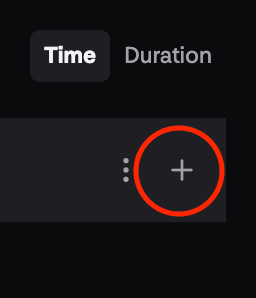
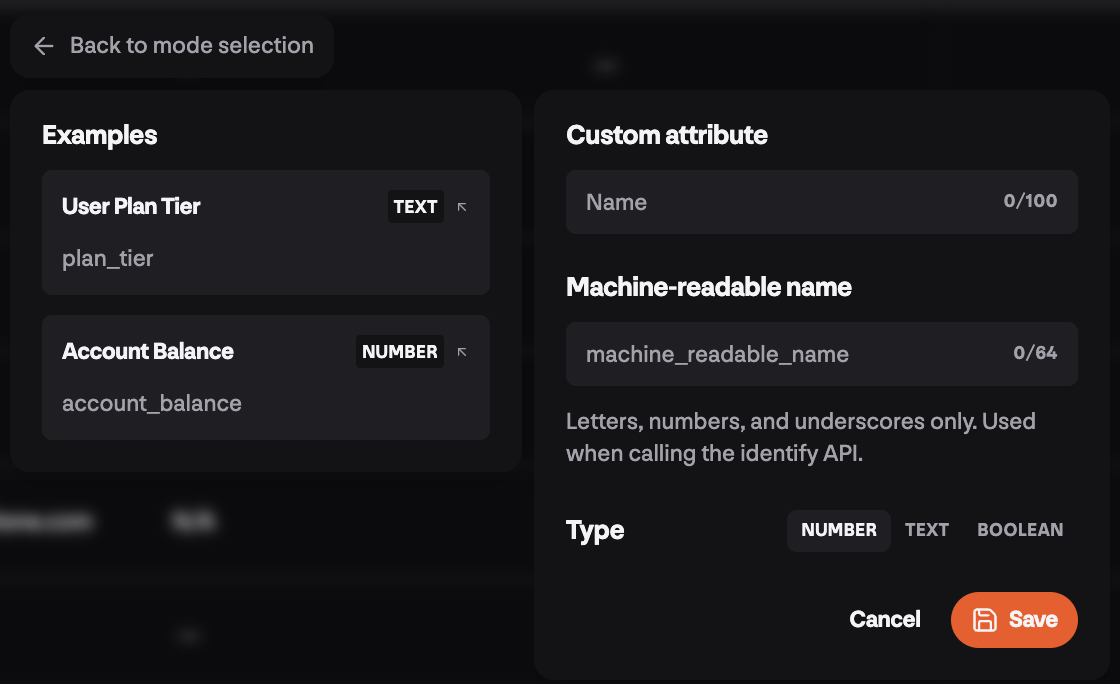
You can create custom attributes that will apear and be filterable in your sessions table by leveraging our **Identify()** API. To get started, head to the sessions table and hit the `+` in the top right header of the table, and hit `Programmatic API` :
This allows you to create:
* a `name` that will display in your sessions table and be filterable
* a machine\_readable\_name that you can customize and is what you will use if passing in a custom property to the Identify API's optional `{}` param. So if you add a custom number attribute with the machine readable name: `exampleCustomAttribute`, you would call the api with:
```javascript theme={null}
// After user authenticates
rehearsals.identify('user@example.com', {
exampleCustomAttribute: 1234
});
```
## Framework-Specific Examples
### React
```jsx theme={null}
import { useEffect } from 'react';
import { useAuth } from './auth-context';
function App() {
const { user } = useAuth();
useEffect(() => {
if (user) {
// Identify user when authentication state changes
window.rehearsals.identify(user.email);
}
}, [user]);
return ;
}
// Logout component
function LogoutButton() {
const { logout } = useAuth();
const handleLogout = async () => {
await logout();
window.rehearsals.reset();
};
return ;
}
```
### Vue.js
```javascript theme={null}
// In your Vue app or router
export default {
mounted() {
// Check if user is logged in
const user = this.$store.state.user;
if (user) {
window.rehearsals.identify(user.email);
}
},
methods: {
async logout() {
await this.$store.dispatch('logout');
window.rehearsals.reset();
this.$router.push('/login');
}
}
}
```
### Next.js
```jsx theme={null}
// In _app.js or _app.tsx
import { useEffect } from 'react';
import { useUser } from '@auth0/nextjs-auth0/client';
function MyApp({ Component, pageProps }) {
const { user } = useUser();
useEffect(() => {
if (user) {
window.rehearsals.identify(user.email);
}
}, [user]);
return ;
}
export default MyApp;
```
### Vanilla JavaScript
```javascript theme={null}
// In your main JavaScript file
(function() {
// Check for logged-in user on page load
const user = getCurrentUserFromYourSystem();
if (user) {
rehearsals.identify(user.email);
}
// Add logout handler
document.getElementById('logout-button')?.addEventListener('click', async () => {
await logoutUser();
rehearsals.reset();
window.location.href = '/login';
});
})();
```
## Troubleshooting
Having issues with user identification?
Get help with common identification issues including users not being linked, merge problems, and session reset issues